
This article may contain affiliate links.
Securing vendor communications, centralizing maintenance notifications, training dispatch teams to identify targeted phishing and establishing backup communication workflows are four simple ways to end charging delays and improve vehicle uptime.
Charging reliability frequently suffers when firmware updates or critical vendor alerts are missed, misdirected or spoofed. Hardware is rarely the sole culprit in these disruptive daily scenarios. By treating your operations inbox as a vital piece of charging infrastructure, fleet managers can eliminate avoidable EV fleet downtime and protect tight delivery margins.
Consider a familiar scenario where it is early Monday morning at a regional delivery depot. Your driver is suited up, manifest in hand and ready to start the first route of the week. However, the electric work truck is not going anywhere. The charger is offline, locked out by a firmware update that ran overnight, and nobody on your team knew it was coming.
The vendor sent an alert Friday afternoon, but it landed in a spam folder. Nobody saw it until the shift was already lost. If you manage an electrified fleet, this communication breakdown likely hits close to home.
Idle vehicles erode delivery windows, strain customer relationships and quietly chip away at operational budgets. Fortunately, these gaps are highly fixable and do not require expensive infrastructure upgrades.
The following strategies are practical habits any fleet operation can build right now. They ensure smooth digital coordination, prevent unexpected access lockouts, and promote consistent fleet electrification.
1. Secure the Emails That Keep Your Chargers Running
Your charging network depends on a steady stream of vendor emails, from firmware updates to outage alerts. Because these messages are the link between your vehicles and their operational uptime, they are now a primary target for cybercriminals.
A single spoofed email can trick a dispatcher into surrendering credentials, locking the team out of the charging portal. The result is immediate: vehicles sit idle while IT scrambles to recover access.
Protecting the inbox is just as critical as maintaining the hardware. To prevent downtime, organizations are moving beyond standard filters toward advanced solutions like Trustifi’s email security and fleet software that automatically flag spoofed addresses.
Audit which team members receive vendor communications and verify those accounts are protected against impersonation. Standard inbox providers often lack the advanced filtering required for this level of operational security.
| Key Insight: Treat your operational inbox with the same priority as your physical charging hardware. Digital security is now a direct component of vehicle uptime and overall fleet reliability. |
2. Centralize Maintenance and Charging Notifications
A pattern that plays out in fleets of every size involves a scheduled charger maintenance window where the vendor notification lands in a personal inbox.
This inbox belongs to a dispatcher who left the company two weeks ago. Nobody forwarded the email, and no redirect was established. The replacement dispatcher shows up at a locked-out charging bay with no explanation and no immediate contact number for support.
This human handoff problem is a massive source of avoidable EV fleet downtime. In fact, communication issues are one of the most frequent sources of charging failures, driving up to 30% of related service calls. When alerts scatter across personal email accounts, text threads, and physical maintenance logs, there is no single source of truth. Without a unified system, there is no reliable way to ensure the right person acts on time-sensitive information.
The fix requires designating a shared operational inbox as the sole destination for all charger maintenance alerts, vendor updates and service scheduling confirmations. Some fleets use a dedicated address, while others route these messages directly through their fleet management dashboard. Beyond basic organization, centralization creates a searchable audit trail. When a charger goes offline unexpectedly, managers can quickly trace whether a maintenance window was scheduled and what action was taken.
Your action step involves mapping out which vendors send operational alerts, then redirecting those senders to your centralized channel. Ensure at least two people have access to that shared inbox. Always establish a clear protocol for acting on incoming notifications.

3. Train Your Team to Spot Fleet-Targeted Phishing
Fleet managers and dispatchers are not cybersecurity professionals, nor should they be. However, they do need to recognize when a message arriving in their inbox is deceptive.
The consequences of clicking a malicious link now manifest physically in the charging bay. EV fleets are attractive targets because their accounts house charging portal credentials, telematics login access and fuel card integrations. Gaining access to even one of these systems can disrupt an entire day of operations.
Attackers know that fleet operations teams are fast-paced, frequently understaffed and accustomed to receiving routine update requests from multiple vendors. Research shows that human error accounts for more than 80% of cyberattacks, making staff awareness absolutely crucial.
- Urgent requests for login credentials or account resets arriving from charging network providers without prior notice or context.
- Mismatched sender details where the display name reads like official support, but the actual email address belongs to an unfamiliar domain.
- Unexpected links to update your fleet account that do not correlate with any recent account activity initiated by your team.
Consider an instance where a dispatcher receives what appears to be a routine telematics update request.
The link leads to a credential-harvesting page styled exactly like their actual fleet software portal. The URL is slightly off by one transposed letter, but during a busy morning shift, the discrepancy goes unnoticed.
Reviewing real-world examples with your team helps build natural vigilance. Your action step is to pull a real example of a phishing attempt targeting a logistics company. Briefly walk your team through what made it suspicious during a shift briefing. Keeping it concrete and recurring builds lasting habits.
| Warning/Important: Cybercriminals target fleet accounts specifically because they offer access to charging portals and telematics. A single stolen credential can lock out your entire fleet during a critical morning shift. |
4. Build Backup Communication Workflows for Charging and Dispatch
Even a well-secured and organized inbox can experience delays, filtering errors, or temporary service outages.
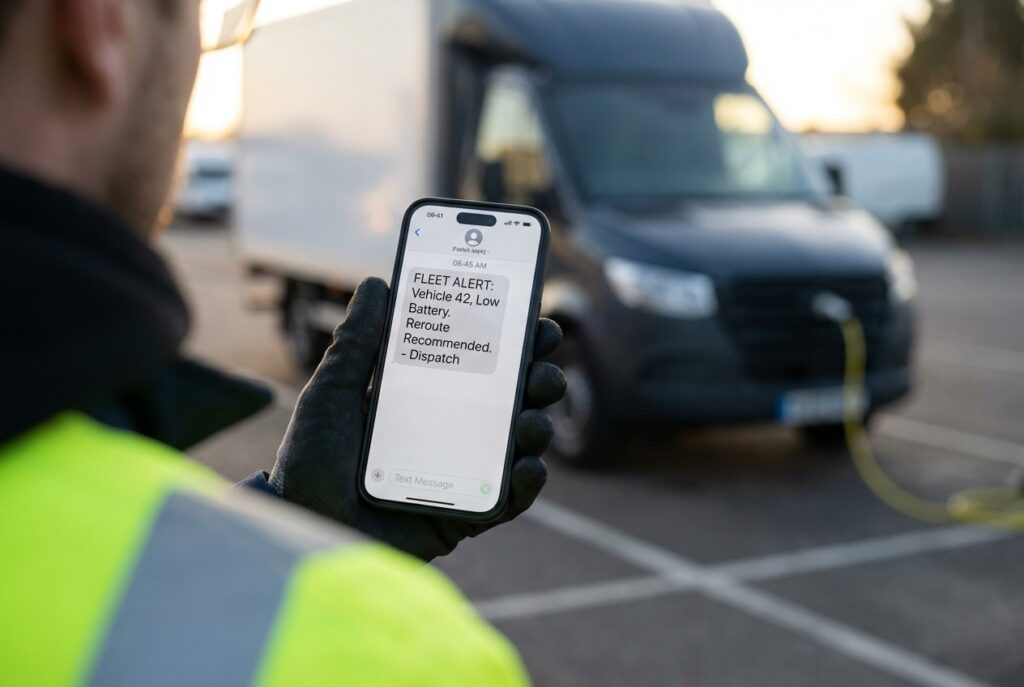
When a critical message about a charger going offline does not arrive in time, routes are not rescheduled. Drivers are not redirected, and uptime plummets simply because the communication chain lacked a failsafe.
Fleet managers already plan for backup charging locations in case a primary station goes down. That identical logic must apply to how critical messages travel through your daily operations. There are several practical redundancy options worth building into your daily workflow.
- SMS alerts for time-sensitive charger outages and service notifications are configured directly within your portal.
- Fleet dashboard push notifications to ensure maintenance reminders are visible outside the email environment.
- Secure messaging apps dedicated to dispatch coordination when traditional email is delayed.
- Printed emergency protocols were posted physically in the depot covering service vendor escalation contacts.
For example, a municipal fleet operation recently configured its charging network to send outage alerts via both email and SMS to three designated contacts simultaneously. When an email delay occurred during a provider migration, the SMS backup ensured dispatchers were notified immediately. This redundancy prevented major route disruptions.
Your action step is to identify your most critical communication types, such as charger outages and maintenance windows. Assign each a primary channel and a secondary backup.
| Pro Tip: Configure your charging network to send outage alerts via both email and SMS. This redundancy ensures your team stays informed even if an email provider experiences a service delay. |

Putting It All Together
Reliable fleet operations require more than just keeping batteries properly charged. They depend entirely on keeping the digital systems behind those vehicles running smoothly.
Both the physical charger and the digital inbox are essential components of your uptime infrastructure. Federal standards now require government-funded chargers to meet a minimum uptime of 97%, setting a high baseline for reliability. To prevent communication-based delays, bring this quick checklist back to your operation.
- Protect charger-related email accounts from phishing and spoofing.
- Centralize all charger maintenance and vendor notifications into one shared channel.
- Train dispatch and operations staff to recognize fleet-targeted phishing tactics.
- Establish backup communication workflows for time-sensitive alerts.
Whether you manage three local vans or an expanding regional electrified fleet, these habits are inexpensive to implement. They can save an entire shift’s worth of productivity with minimal initial effort. Start by addressing the communication gap you already know exists, and build a more resilient operation from there.

Hello Sir,
I hope you are doing well. I would like to know your publishing rates for guest posts/articles. I currently have two orders ready for publication, and if we can agree on the budget, I can send the articles right away.
Both articles are 100% human-written and ready to publish. Please let me know your pricing and budget requirements.
Looking forward to your response.
Best regards
Sana,
We sent you our publishing guidelines to your email addes. –ed.